Hi, i am Nuri. Just another IT guy working on fintech and telco at Jakarta, Indonesia. While tech stuff became my daily breakfast, i also love to travel around the globe and taking photos also. I DJ on my spare time while dealing with any mess my 9 cats made at home :)
Gak terasa Lebaran akan tiba dalam beberapa bulan lagi. Guna menghadapi momentum tersebut, Telkomsel kembali menghadirkan program mudik bareng yang diperuntukkan bagi pelanggan setianya.
Pelanggan cukup mengakses *700*123#, di mana periode registrasi dibuka mulai 15 April hingga 3 Juni 2014. Selanjutnya pelanggan dapat mengikuti mekanisme lelang Telkomsel Poin harian. Registrasi akan dibuka setiap hari pada pukul 10.00 WIB dan ditutup kembali pada pukul 21.00 WIB.
Tahun ini Telkomsel melalui program Telkomsel Poin menggelar mudik bareng dengan menggunakan moda transportasi pesawat dan kereta api. Tersedia total 450 tiket pesawat Garuda Indonesia ke 3 rute tujuan, Jakarta – Yogyakarta (150 tiket untuk 75 pemenang), Jakarta – Solo (150 tiket untuk 75 pemenang), dan Jakarta – Surabaya (150 tiket untuk 75 pemenang).
Sedangkan untuk moda kereta api, tersedia 2 rute tujuan yakni KA Bima (Jakarta – Surabaya, via jalur selatan Pulau Jawa) dan KA Argo Bromo Anggrek (Jakarta – Surabaya, via jalur utara Pulau Jawa). Ada 600 tiket yang tersedia untuk 300 pemenang.
Scratchpad is a tool which is include in Mozilla Firefox browser. It is is essentially a live JavaScript editor and prototyping tool. You can access it through menu Tools -> Web Developer Scratchpad. Or you can just simply open it using shortcut Shift+fn+F4 (In Mac OS X).
Unlike other tools such as Web Console or Firebug, Scratchpad lets you edit larger chunks of JavaScript code, then execute it in various ways depending on how you want to use the output. It wont interpreting single line of code at a time. Using the Scratchpad, a developer can access the current page’s objects, variables and script. In addition, complete functions can be written and tested in the editor within the scope of the live page. These changes can then be attached and saved with the current application.
Although this tools is very handly and friendly for developer, for some people it can be annoying and irritating. There are complaints about it. Eg, sometimes, when you start to type in an email or a form, Javascript Scratchpad opens, and you’re typing in that window. Or Scratchpad is just opened whenever you open a browser tab and accessing a website.
So how to deal with that?
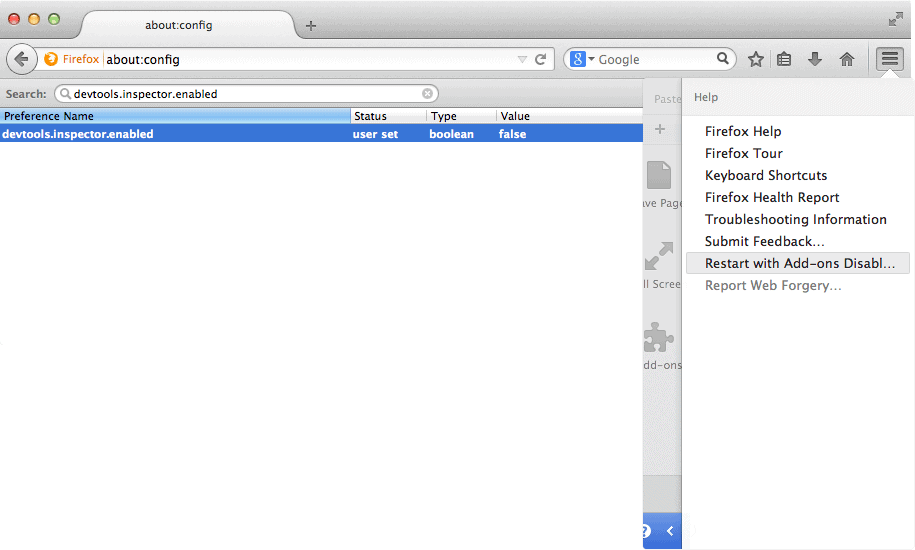
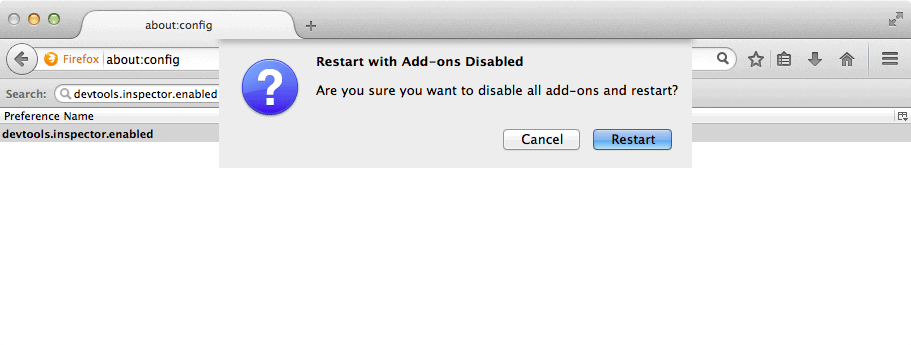
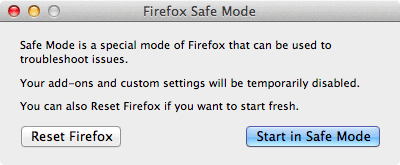
1. Start Firefox in Safe Mode to check if one of the extensions or if hardware acceleration is causing the problem (switch to the DEFAULT theme: Firefox/Tools > Add-ons > Appearance/Themes). To do the Safe mode, follow these steps:
Click on menu icon in the top right of your Firefox browser and click on icon “?” next to CuztomizeChoose Restart with Add-ons DisableConfirmation to restart Firefox
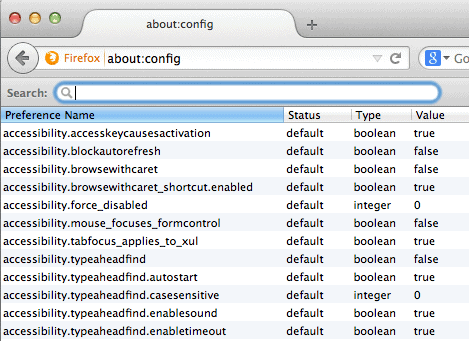
2. Various Web Developer tools each have their own pref on the about:config page to enable or disable them.
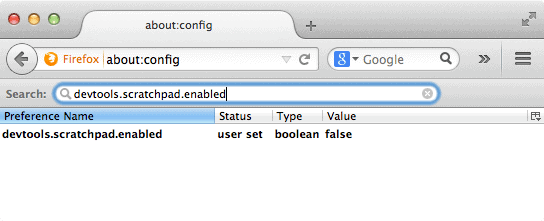
devtools.scratchpad.enabled
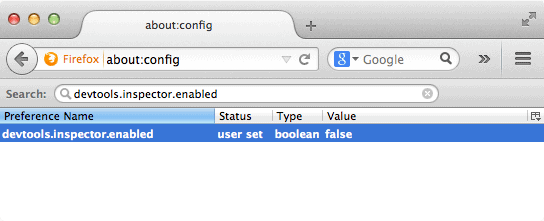
devtools.inspector.enabled
Follow these steps:
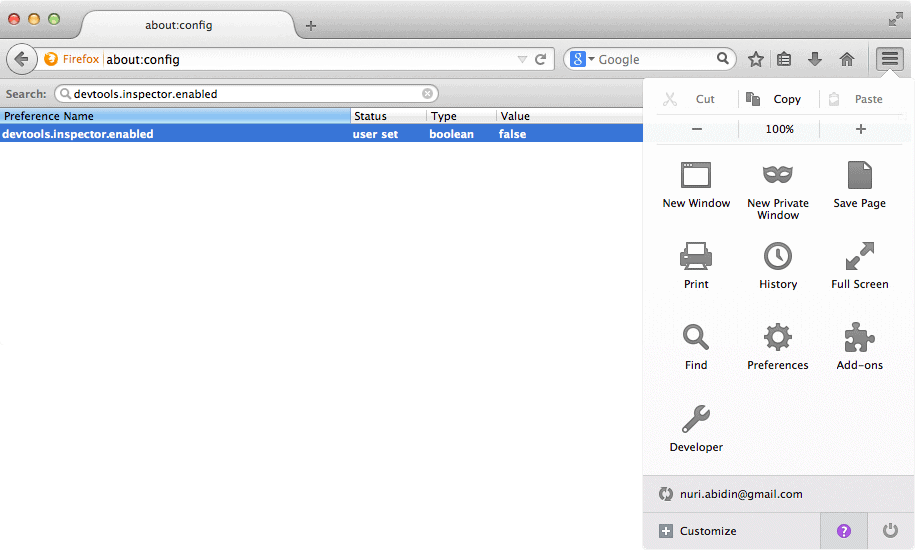
type about:config in your address barsearch for devtools.inspector.enabled and set it to false by double click on itsearch for devtools.scratchpad.enabled and set it to false by double click on it
Set those configs to false on the about:config page to disable the Scratchpad. All you need to do is just double click on those settings to toggle it true/false.
That should work. If it doesn’t, then you can try to reset your Firefox settings back to its factory default 🙂
Pertama kali melihat Firefox #Australis adalah saat saya berada di Mozilla Summit Oktober 2013 di Santa Clara, CA. Namun saat itu, kesan yang timbul dari presentasi mengenai #Australis lebih ke arah theme browser Firefox. Dan beberapa jam sebelum terbang ke San Francisco minggu kemarin saya berkesempatan mencoba sendiri versi official Mozilla Firefox 29 yang mengimplementasikan #Australis ini.
Pas berkesempatan mampir ke kantor Mozilla untuk ikutan launching party Firefox 29 ini, saya menyempatkan bertanya-tanya ke beberapa orang UX designer mengenai fitur-fitur di baliknya.
Awesome, it’s not just a skin make over. I could say that Firefox 29 is the largest update to Firefox since.… well, ever 🙂
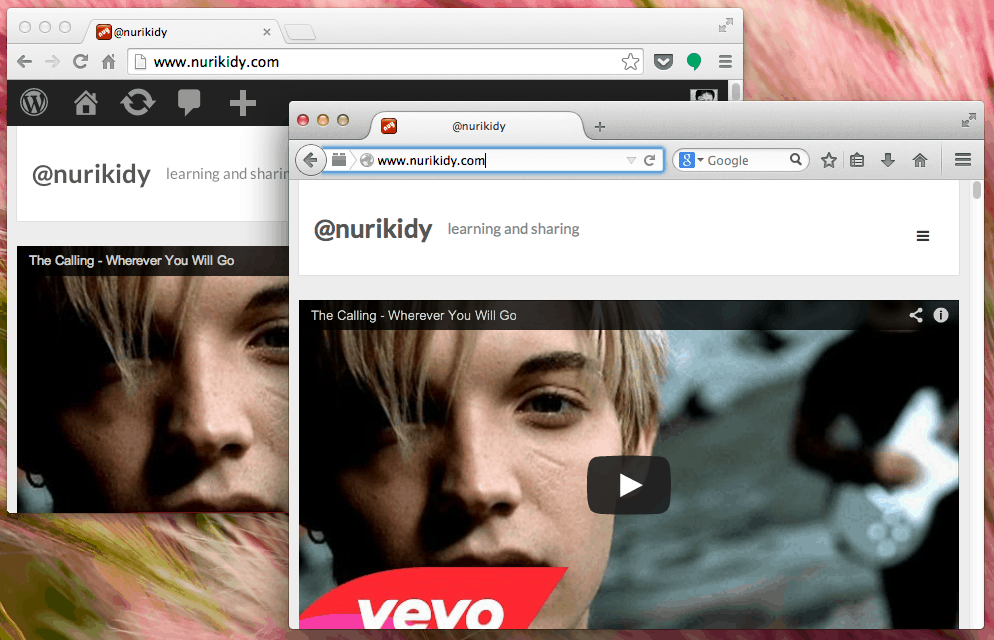
Secara kasat mata, FFx 29 layoutnya sederhana, lembut dan mirip Google Chrome. Seperti gambar di bawah ini, bentuk tabsnya yang bulat ga kotak lagi, bagian paling kanan atas digantikan dengan ikon menu. Yang masih tersisa adalah kotak pencarian (search bar) dan tombol ‘Back’ yang gede banget itu. Mengingatkan tombol-tombol di Netscape 6 aja.
Firefox 29 vs Chrome
Selain tampilan yang berubah total, Firefox 29 juga mempunyai update terhadap fitur Firefox Sync. Sekarang kita bisa menggunakan Firefox Accounts. Opsi customization-nya juga jadi lebih banyak.
firefox-sync
Buat yang belum tahu apa itu Firefox Sync, fitur ini bisa dibilang sama dengan punya Google Chrome. Dengan Sync, kamu bisa membawa informasi tabs yang kamu buka, bookmark juga info-info personal lainnya ke berbagai perangkat yang kamu gunakan selama itu menggunakan browser Firefox. Katakanlah isi bookmark Firefox di Macbook kamu akan sama dengan Firefox yang ada di tablet maupun ponsel Android kamu (juga ponsel/tablet Firefox OS). Di manapun kamu membuat isian bookmark, dia akan tereplikasi ke perangkat-perangkat lainnya. Cukup login menggunakan Firefox Accounts saja di semua perangkat tadi.
Yup, sama halnya dengan akun Google (gmail) kamu, Firefox Accounts ini -juga merupakan bagian dari Firefox OS- memungkinkan pengguna melacak login mereka untuk berbagai layanan, serta bookmark, history browsing, dan setiap tab yang terbuka.
Hmm,
this song suddenly come up my mind
i bet you’ve never heard this song
but this is the “theme song” 🙂
Someone Like you by The Summer Set
Cause the little things don’t mean much to me My girl, I’d cross the whole world for someone like you Oh oh, no matter where I go, oh oh, My unpredictable girl, you’re impossible girl, You know that it’s true, oh oh, no matter what you do, I’d cross the world for someone like you
We’re a million lonely people All together on this needle in the sky Afraid of heights And your dreams were made illegal By the laws of lesser evil we call life But not tonight
I dare you to love I dare you to cry I dare you to run I dare you to try I dare you to fall And lay on the ground I dare you to feel I dare you to be here now
You’re an outline of a vision That you had when we were children yesterday You watch it fade Let your heart be your religion Let it break you out of this prison you became It’s not too late
I dare you to love I dare you to cry I dare you to run I dare you to try I dare you to fall And lay on the ground I dare you to feel I dare you to be here now
I dare you I dare you
Try the Remix version from Andrew Reyel, it’s also awesome 🙂